
How can I help you?
Answers to frequently asked questions
How do I view a DISC report in a different language?
Currently DISC assessments and reports are available in English, French, and Spanish. To view a DISC report in a different language:
1. Open your team chart and scroll down to a team member
2. Click on Original View
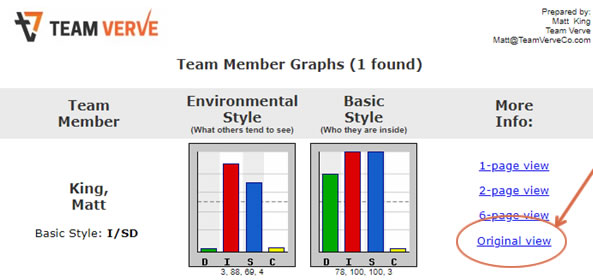
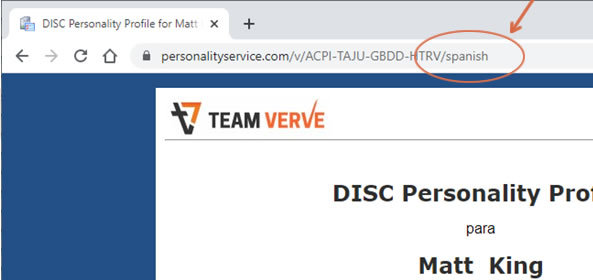
3. In the browser address bar add /english, /french, or /spanish to the end of the url and hit enter
example: change https://www.personalityservice.com/v/ACPI-TAJU-GBDD-HTRV to https://www.personalityservice.com/v/ACPI-TAJU-GBDD-HTRV/spanish
Can I upgrade my report?
Yes, you can upgrade your report without taking the assessment again. The upgraded report will also be discounted from regular price. For example many people choose to upgrade their standard 6-page report to a full leadership report. Learn more about different reports here.
Send Matt an email with your full name and the report you wish to upgrade to.
How do I add or remove a member from my team chart?
Send Matt an email with the team members full name and email address.
How do I use the interACTION guide?
This resource allows you to obtain a report for any two participants to learn about each other and how to work effectively together.
1. Open your team chart and scroll to the end of your team chart
2. Choose a team member from Person #1 list

3. Choose a team member from Person #2 list
4. Select View
5. View the 11 page interaction guide to help improve your relationship based on greater understanding of each other’s unique qualities.
6. Remember: Everyone is a blend of all 4 traits, you can change the letter at the bottom of the chart and click update to view their interaction guide in that style.